AI in Change Management: Co-Pilots, Chatbots & Intelligent Nudges
 ACTSol and Associates
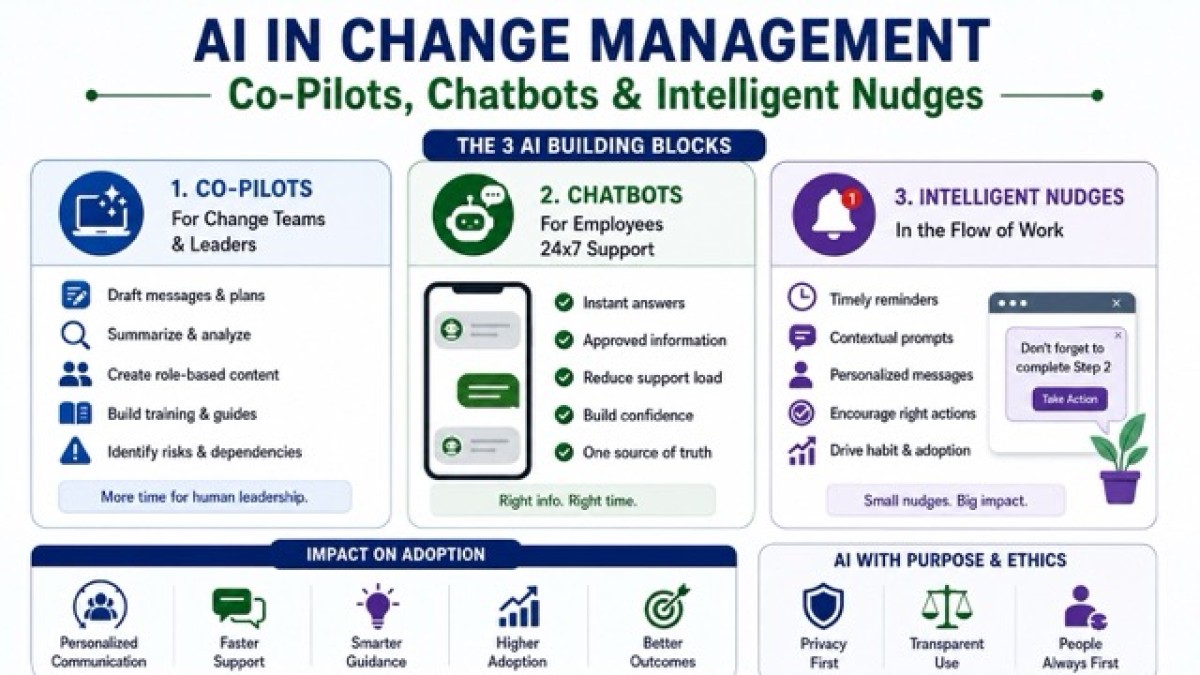
Use AI co-pilots, chatbots, and nudges to support change—without skipping leadership or judgment.

AI is not a “change management shortcut.” It doesn’t remove the need for leadership, clarity, or hard decisions.
What it does do is amplify whatever you already are.
- If your change story is vague, AI will help you produce vague content… faster.
- If your training is bloated, AI will summarise it… without fixing the confusion.
- If your culture is low-trust, AI-driven monitoring will feel like surveillance, not support.
Used well, AI becomes the quiet engine behind modern adoption: personalised communication, on-demand learning, and continuous listening at a scale no human team can sustain.
Used poorly, it becomes a trust grenade.
This article breaks AI-enabled change into three practical “building blocks” you can actually deploy co-pilots, chatbots, and intelligent nudges and then deals honestly with the ethical tension that comes with AI-enabled influence.
The 3 AI building blocks of adoption
1) Co-pilots (for change teams and leaders).
A co-pilot is an AI assistant embedded in the tools people already use email, documents, meeting notes, intranets, project tools helping leaders and change teams draft, analyse, summarise, plan, and respond.
Think of co-pilots as productivity + sensemaking:
- Draft targeted messages for different stakeholder groups
- Convert workshop notes into action plans and comms calendars
- Generate role-based “what changes for me” summaries
- Turn policy documents into quick reference guides
- Build training outlines and knowledge checks
- Scan risks and dependencies across workstreams
The best use of a co-pilot is not “write me an email.”
It’s: reduce the time spent producing content, and increase the time spent doing the human work—listening, negotiating, and leading.
McKinsey’s guidance on change in the age of gen AI reinforces this idea: value comes when employees become active participants and experimentation is normal, not when AI is treated as a top-down broadcast engine.
2) Chatbots (for employees, 24×7)
Change creates a predictable problem: questions spike, support teams drown, and people form opinions in the silence.
A change chatbot is an employee-facing assistant that answers questions using approved sources: policy pages, SOPs, training material, FAQs, release notes, and process maps.
It becomes your single front door for “What do I do now?”
Zendesk describes knowledge-based chatbots as bots connected to a knowledge repository for one-to-one self-service, which is exactly what change teams need when questions multiply.
What this looks like in practice:
- “How do I raise a purchase request in the new system?”
- “What’s the new approval limit for my role?”
- “Where do I log customer complaints now?”
- “What’s changing in my monthly reporting?”
- “Show me the 5 steps and the form link.”
The point is not novelty. It’s reducing friction during the messy middle of adoption.
3) Intelligent nudges (in the flow of work)
Nudges are small design choices that guide behaviour without heavy enforcement defaults, reminders, prompts, social proof, timely micro-messages.
BCG describes digital nudges as low-cost, timely interventions rooted in behavioural economics that influence decisions in context. Academic work on “enterprise digital nudging” also flags the double edge: done well, nudges improve adoption; done aggressively, they trigger rejection because people feel coerced.
In change management, intelligent nudges are where AI becomes powerful because AI can tailor nudges based on:
- Role and location
- Stage of adoption
- Common errors
- Previous completions
- Confidence signals (“still struggling with step 3”)
This is behaviour shaping at scale, which is exactly why ethics matters (we’ll get there).
Let’s take the three areas you asked for and get practical.
1) Personalised communication: from “broadcast” to “relevance”
Most internal communication fails for one boring reason: it’s written as if everyone needs the same message.
AI helps you shift from one message for all to one narrative, many versions.
What AI can personalise (without breaking governance)
A. Stakeholder-specific “what changes for me” versions
Example: ERP rollout.
- A finance controller needs: controls, cutover plan, month-end implications
- A project manager needs: approvals, WBS impact, reporting changes
- A site engineer needs: how to raise requisitions, how to track material issues
- A vendor coordinator needs: onboarding, PO changes, payment milestones
A co-pilot can generate four variants in minutes; but only if your change team supplies the truth:
- New process steps
- Policy rules
- Timelines
- Do / don’t scenarios
- Escalation points
B. Tone and trust calibration: In low-trust environments, the same message can land as a threat or support depending on language.
AI can help you produce versions that are:
- Direct and compliance-oriented (for audit topics)
- Supportive and coaching-oriented (for learning topics)
- Simple and operational (for frontline staff) •executive summary (for leaders)
C. Translation and localisation
Not just language translation; context translation:
- Local examples
- Local constraints (bandwidth, shift patterns, device access)
- Local terminology
D. Smart Q&A generation
From a policy update, generate
- Top 25 likely questions
- Crisp answers
- “What we know / what we’re still confirming”
- Links to source of truth
This is the underrated win: your communication becomes anticipatory instead of reactive.
A realistic example: policy change in a customer service team
Change: new customer escalation policy + updated CRM workflow.
Old world:
- One email
- One town hall
- Confusion spreads through WhatsApp and side conversations
AI-enabled approach:
- Co-pilot drafts segmented messages:
- Agents, team leaders, quality analysts
- Chatbot updated with the policy and examples:
- “What counts as a priority escalation?”
- “What do I do if customer threatens legal action?”
- Nudges appear in CRM when an agent selects certain categories:
- “Priority escalation requires TL approval click here to request.”
Result: fewer errors, faster learning, less drama.
2) AI-supported training: shorter, adaptive, role-based
Traditional training tries to win adoption through volume:
- Long decks
- Long videos
- Long manuals
But people don’t adopt change by consuming content. They adopt it by performing the new behaviour, repeatedly, with feedback.
AI improves training in three high-impact ways:
A. Microlearning generation and sequencing: From your SOP / process doc, AI can generate:
- 5–7-minute modules •scenario-based questions
- Role-specific practice flows
- “Common mistakes” callouts
AI-driven personalisation in corporate training is widely discussed as a way to improve engagement and outcomes through adaptive content and learning paths.
B. “Coach mode” (learning in the moment): Instead of “attend training, then hope you remember,” employees ask the chatbot while doing the work:
- “I’m stuck at step 4 what do I click next?”
- “Which document do I attach?”
- “What’s the approval logic?”
This is training inside the process, not outside it.
C. Practice + feedback loops: AI can generate safe practice scenarios:
- “Here are three vendor cases classify and decide the right action.”
- “Here are five invoices spot what fails validation.”
If you combine this with human review (team leads, SMEs), you create a fast proficiency engine.
A realistic example: onboarding for a new operating model
Change: shared services model introduced (central teams + local teams).
Training approach:
- AI co-pilot generates role-based playbooks:
- Local HR → what requests go to shared services
- Shared services team → standard handling and SLAs
- Managers → what they approve, what they don’t
- Chatbot becomes the “how-to” desk:
- Form links, SLAs, escalation paths
- Nudges appear in the service portal:
- When a manager selects “urgent,” system prompts required justification + policy reminder
Outcome: fewer tickets bounce around; “this isn’t my job” reduces because the system guides the right channel.
3) Monitoring sentiment at scale: listening without becoming creepy
Sentiment monitoring is tempting because change teams are always late to the truth:
- Resistance surfaces after adoption drops
- Trust breaks after rumours spread
- Leadership learns the hard way
AI-driven sentiment analysis can help detect emotional trends early across large volumes of text, but it also raises serious questions about interpretation, consent, and usage. So, here’s the mature approach:
Sentiment monitoring that builds trust (not fear)
A. Use aggregated signals, not individual surveillance Aim for:
- Team-level sentiment (not person-level)
- Department heatmaps
- Topic clusters (what people are worried about)
B. Prefer opt-in and disclosed channels
Examples:
- Pulse surveys with free text
- Feedback forms in the intranet
- Change clinic transcripts (with notice)
- Support ticket themes
C. Combine qualitative + quantitative
Sentiment alone can mislead. Pair it with:
- Adoption metrics (usage, completion, error rates)
- Training progress
- Service desk volumes
- Process cycle times
D. Close the loop publicly. If people share feedback and nothing changes, they stop sharing.
A good loop is:
- “We heard X”
- “We changed Y”
- “Here’s what we’re still working on”
- “Here’s how you can help”
What not to do: Avoid “silent monitoring” of private messages, keystrokes, or hidden scoring of individuals. That crosses into workplace surveillance territory, which many commentators warn can damage privacy and trust even if the intent is efficiency. And once trust breaks, your change program becomes a politics program.
To make this usable, here’s a clear map; where AI helps most:
- Impact analysis acceleration
- Summarise process changes
- Map “old vs new” role impacts
- Generate role-based action lists
- Stakeholder intelligence
- Cluster stakeholder feedback themes
- Identify influence networks from engagement data (ethically)
- Track stakeholder commitments and follow-ups
- Communication production at scale
- Segmented drafts
- Q&A generation
- Translation / localisation
- Executive brief packs
- Training design + reinforcement
- Microlearning creation
- Scenario banks
- Job aids and quick reference guides
- Coaching prompts for managers
- Hypercare automation
- Chatbot triage (“do you mean policy or system issue?”)
- First-response resolution
- Ticket summarisation for support teams
- Adoption + risk early warning
- Sentiment + usage patterns
- Error spikes
- “Drop-off points” in workflows
- Recurring confusion themes
Intelligent nudges: examples that actually drive adoption
Nudges fail when they are preachy. They work when they are timely, specific, and helpful.
10 practical nudges you can deploy (with AI tailoring)
- Default options: New policy default selected, with explanation and “change” option
- Just-in-time reminders: At the moment a user tries an old workflow, prompt the new one
- Micro-checklists: 3-step checklist appears before submission
- Error-proofing prompts: “This selection usually requires attachment X add now?”
- Social proof: “80% of your team now uses the new template”
- Commitment prompts: “Schedule your first run this week choose a slot”
- Progress visibility: “You’ve completed 3 of 5 steps to proficiency”
- Manager nudge kits: weekly talking points auto-sent to managers based on adoption gaps
- Personalised reinforcement: “You struggled with step 2 last time here’s a 60-second refresher”
- Recognition nudges: highlight “quality-first” adoption, not just speed
Axios’ reporting on behaviour-science nudges in the workplace (e.g., Humu) illustrates how personalised nudges can shape everyday habits; especially in distributed work contexts.
The ethical line: when “enablement” becomes manipulation
AI makes change more influential. That’s the point. But it also makes change more capable of crossing boundaries.
The question is not “Can we do this?” It’s: Should we? Under what safeguards? With what transparency?
Ethical risk #1: Surveillance creep
You start with “sentiment monitoring” and end up with:
- Productivity scoring
- Behaviour scoring
- Manager dashboards ranking people by “attitude” Even if you never intended it, the system could drift there. And people can feel it.
Ethical risk #2: Hidden persuasion
Nudges can become dark patterns:
- Pushing compliance through friction
- Using fear framing
- Making alternatives hard to find
Enterprise digital nudging research explicitly warns that intense nudges can trigger rejection when users feel coerced.
Ethical risk #3: Bias at scale
If your training data reflects organisational bias, AI will reinforce it:
- Who is labelled “resistant”
- Which roles are “slow adopters”
- Which feedback is treated as “noise”
Ethical risk #4: Hallucination and false certainty
A chatbot that confidently gives the wrong policy answer is worse than no chatbot.
Ethical risk #5: Unequal access
AI-driven enablement can widen gaps:
- Frontline staff without devices get less support
- Regional languages poorly supported
- Workers with lower digital literacy get left behind
Ethical risk #6: Policy confusion and shadow AI
If employees don’t know what tools are allowed and what data is safe, they either avoid AI or use it secretly.
The Financial Times has highlighted how inconsistent workplace AI rules confuse staff and increase misuse risk; exactly the opposite of responsible adoption.
A practical ethics framework: “CLEAR” governance for AI-enabled change
Use this five-part lens before deploying AI in change programs:
1) C-Consent & transparency
- Are employees informed where AI is used?
- Are they told what data is collected and why?
- Is there a clear “human escalation” path?
EU-focused commentary on employee monitoring and the AI Act stresses safeguards for worker rights and transparency obligations in high-risk contexts.
2) L-Limits on data
- Data minimisation: collect only what’s needed
- Avoid private channels unless legally and ethically justified
- Prefer aggregated analysis
3) E-Explainability
- Can you explain why the system suggested a nudge?
- Can you show sources for chatbot answers?
- Can people challenge decisions?
4) A-Accountability
- Who owns outcomes when AI is wrong?
- Who approves the knowledge base?
- Who audits prompts, outputs, and drift?
This aligns well with established responsible AI frameworks like the OECD AI Principles (human rights, transparency, accountability) and NIST’s AI Risk Management Framework (govern, map, measure, manage).
5) R-Review & audit
- Regular testing for bias and accuracy
- Log monitoring
- Clear incident response when outputs harm trust or compliance
If you want a management-system approach, ISO / IEC 42001 provides a formal structure for establishing and improving an AI management system inside organisations.
Implementation: a 90-day AI-enabled change rollout that won’t blow up trust
Here’s a pragmatic path that balances speed with governance.
Days 1–15: pick the right slice
Choose one change initiative with:
- High volume of questions
- Clear process documentation
- Measurable adoption metrics
- Willing sponsors
Do not start with the most political change.
Days 16–30: build the “source of truth”
- Curate the knowledge base
- Define what is “approved”
- Assign content owners
- Write escalation rules (“if unsure, refer to human support”)
Days 31–60: deploy chatbot + co-pilot workflow
- Chatbot for employees (FAQs, how-to)
- Co-pilot for change team content production
- Set usage boundaries (data handling, tool permissions)
Days 61–75: add nudges in 1–2 workflows
Pick the highest-friction steps:
- Form submission errors
- Missing attachments
- Approvals
- Common misclassifications
Design nudges that are:
- Specific
- Optional
- Respectful
- Measurable
Days 76–90: instrument, learn, refine
Track:
- Question resolution rate
- Time to proficiency
- Error reduction
- Ticket volume change
- Sentiment themes (aggregated)
- Adoption lift from nudges Then scal
What great looks like: the “Human + AI” operating model
AI should not replace change leadership. It should industrialise the repetitive parts so humans can do the relational parts.
A healthy operating model looks like this:
- AI handles: drafts, summaries, first-response support, pattern detection
- Humans handle: decisions, trade-offs, empathy, negotiation, ethics, accountability
If you’re doing the reverse, you’re playing with fire.
Closing insight: AI doesn’t manage change; people do
Co-pilots help you move faster. Chatbots help you support better. Intelligent nudges help you shape habits.
But the core physics of change remains the same:
- People adopt what they understand
- They support what they trust
- They sustain what they experience as fair
AI can strengthen all three; or break all three depending on whether you treat AI as a trust amplifier or a control mechanism.
If you build AI-enabled change with transparency, limits, and accountability, you get a modern advantage: personalised enablement at scale.
If you don’t, you’ll still get scale; just not the kind you want: scaled confusion, scaled resentment, and scaled resistance.
The future of change management isn’t “AI doing change.” It’s AI making room for humans to lead change properly.
Categories: : AI