Building Your Change Toolkit: Templates, Playbooks & Checklists
 ACTSol and Associates
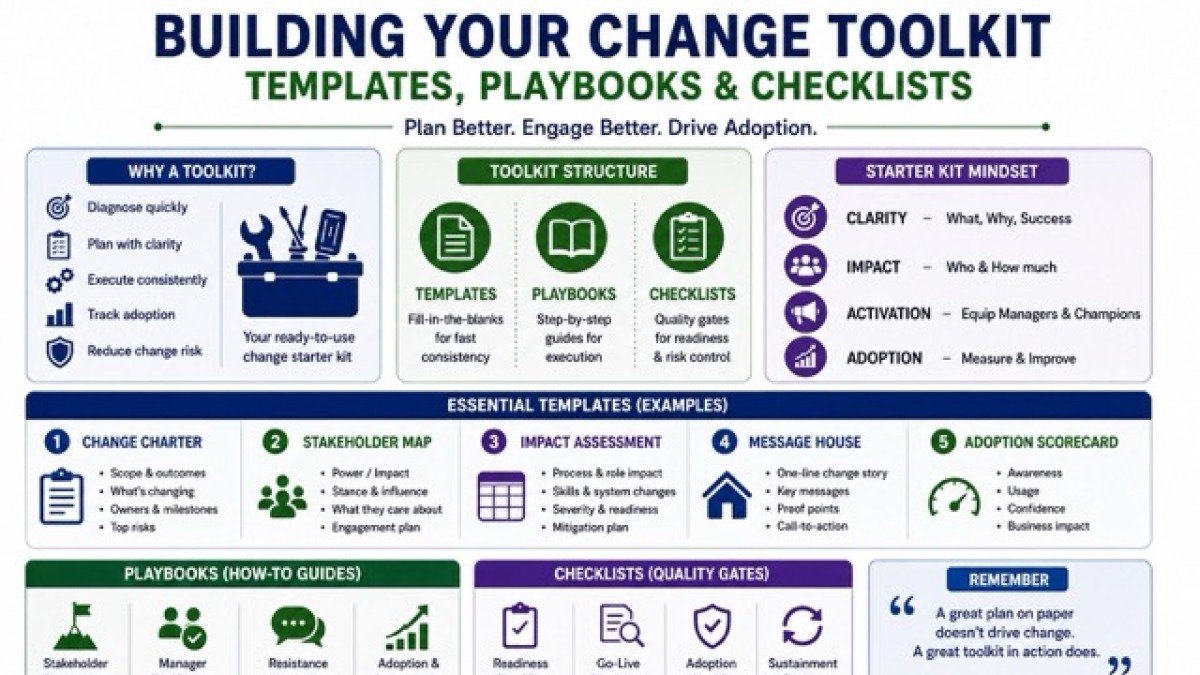
Ready-to-use templates, playbooks, and checklists so change programmes start prepared on Day 1.

Change programmes rarely fail because someone forgot a clever model. They fail because the basics weren’t ready on Day 1.
No shared story. No clear impacts. No owner for adoption. No way to track whether people are actually using the new thing. No simple mechanism to capture resistance before it becomes sabotage. No consistent cadence to align leaders, managers, and frontline teams.
That’s why a serious change practitioner doesn’t start with a slide deck. They start with a toolkit.
A change toolkit is not bureaucracy. It’s speed. It’s consistency. It’s repeatability. It’s the difference between reinventing your approach for every initiative and standing up a working change system in 72 hours.
This article positions your toolkit as a practical “starter kit” you can drop into any new initiative or client engagement; ERP, CRM, policy rollout, operating model change, automation, AI enablement, shared services, you name it. The artefacts below are the ones you’ll reach for again and again.
What a “Change Toolkit” actually is
A toolkit is a set of ready-to-use artefacts; templates, playbooks, and checklists that help you:
- a) Diagnose the change quickly
- b) Plan interventions without guesswork
- c) Execute with a predictable cadence
- d) Track adoption like a product team tracks usage
- e) Prevent “change theatre” (loud communication, low behaviour change)
Think of it like a pilot’s cockpit. You don’t redesign the instruments each flight. You standardise the essentials so you can focus on flying.
The Starter Kit mindset: Minimum Viable Change (MVC)
When you join a new initiative, there’s pressure to “start delivering” immediately.
Your goal is to stand up Minimum Viable Change:
- Clarity: What is changing, why, and what good looks like
- Impact: Who is affected, how, and how much
- Activation: Managers and champions equipped to drive behaviour change
- Adoption: Simple metrics + feedback loops to see reality
Everything in your toolkit should serve one of these four outcomes.
Your essential toolkit organised into three layers
A practical way to structure your toolkit is:
- Templates (fill-in-the-blanks): fast consistency
- Playbooks (how-to guides): repeatable execution
- Checklists (quality gates): risk prevention and readiness
Let’s build your starter kit using this structure.
Layer 1: The Essential Templates
1) Change Charter (1–2 pages)
Purpose: Align sponsor, programme lead, and key stakeholders on what the change is and is not.
Template fields:
- a) Change name + scope boundaries
- b) Business outcomes (measurable)
- c) What’s changing (process / roles / tech / policy)
- d) Who owns adoption (named roles)
- e) Target groups (high-level)
- f) Go-live milestones and decision gates
- g) Top 5 risks + assumptions
- h) Governance cadence (SteerCo, working group, site forums)
Example: A CRM rollout isn’t “implement Salesforce.” It’s “standardise pipeline stages, enforce activity logging, reduce lead leakage, and increase forecast accuracy.” The charter makes that explicit before the build begins.
2) Stakeholder Map + Influence Plan
Purpose: Replace “we’ll communicate to everyone” with targeted engagement.
Template fields:
- a) Stakeholder group / role
- b) Power (high / med / low)
- c) Impact (high / med / low)
- d) Likely stance (supportive / neutral / sceptical)
- e) What they care about
- f) What they fear
- g) Influence strategy (1:1, group session, demo, proof pilot)
- h) Owner + frequency
Example: For an ERP implementation, Finance may be high power / high impact / supportive; Plant Supervisors may be low power / high impact / sceptical. Your plan changes accordingly; less broadcast, more on-floor demonstrations and supervisor enablement.
3) Change Impact Assessment (CIA) Matrix
Purpose: Turn vague “this will be a big change” into structured, actionable insight.
Template fields (rows by impacted group, columns by impact type):
- a) Process changes (what steps change)
- b) Role / accountability changes (who does what)
- c) System changes (screens, approvals, data entry)
- d) Policy / compliance changes (rules and controls)
- e) Skills / behaviours required (new habits)
- f) Volume and frequency (daily / weekly / rare)
- g) Severity rating (1–5)
- h) Readiness risk (1–5)
- i) Mitigation (training, job aids, policy clarifications)
Example: If warehouse users now must scan every movement (instead of manual entries), the impact is not “system change.” It’s “time pressure + habit change + compliance enforcement.” Your CIA forces you to plan for that reality.
4) Communications “Message House”
Purpose: Ensure every communication reinforces the same spine.
Template structure:
- a) Roof: One-line change story (“Why now?”)
- b) Pillars: 3 key messages
- c) Proof points: evidence, benefits, early wins
- d) Call-to-action: what you want people to do this week
- e) FAQ bank links
Example: For a new SOP rollout: Roof = “We are standardising critical workflows to reduce rework and protect customer trust.” Pillars = “Clarity, speed, compliance.” CTA = “Use the new checklist on your next job; log exceptions.”
5) Comms Plan (Channel × Audience × Cadence)
Purpose: Convert the story into a disciplined drumbeat.
Template fields:
- a) Audience segment (not “all staff”)
- b) Objective (inform / prepare / activate / reinforce)
- c) Message theme
- d) Channel (toolbox talk, WhatsApp group, email, huddle, demo, town hall)
- e) Frequency and dates
- f) Sender (sponsor vs manager vs change champion)
- g) Feedback mechanism (poll, Q&A, office hours)
Owner Example: A plant environment may need shift huddles + noticeboards + short videos, not email-heavy comms. The template forces channel realism.
6) Training Needs & Enablement Matrix
Purpose: Make training role-based and job-focused, not content-dumped.
Template fields:
- a) Role
- b)Tasks performed
- c) Competency required (knowledge/skill/behaviour)
- d) Training format (demo, simulation, shadowing)
- e) Time required
- f) Assessment method
- g) Reinforcement (job aid, buddy, manager check-in)
- h) Owner + completion tracking
Example: In an RPA rollout, users don’t need “what is automation.” They need: “How to trigger the bot, what exceptions look like, and how to escalate failures without breaking the process.”
7) Resistance & Concern Log (with response strategy)
Purpose: Treat resistance as data, not attitude.
Template fields:
- a) Who raised it (role / site)
- b) Concern statement (in their words)
- c) Type (fear of workload, control, competence, job loss, trust)
- d) Validity (real / assumed / misinformation)
- e) Response strategy (fix, clarify, negotiate, escalate)
- f) Action owner + due date
- g) Status
Example: “New approvals will slow us down” may be valid. The response could be: redesign thresholds, automate approvals, or pilot the workflow to show actual cycle time impact.
8) Adoption Metrics Dashboard (simple, behavioural)
Purpose: Measure use, not awareness.
Minimum metric set:
- a) Usage: logins, transactions, completion rates
- b) Quality: error rates, rework, exception volumes
- c)Speed: cycle time before / after
- d) Coverage: % teams using new process
- e) Capability: training completion + proficiency checks
- f) Sentiment: pulse score + key themes
Example: For CRM: “% opportunities with next step logged” is more meaningful than “# training attendees.”
Layer 2: The Playbooks (Your repeatable “how-to” guides)
Templates are forms. Playbooks are your operating system.
9) Sponsor Playbook (what good sponsorship looks like)
Purpose: Sponsors don’t need motivation. They need a script.
Include:
- a) Sponsor role in 5 behaviours (not 20 bullet points)
- b) Monthly sponsor talking points
- c) How to handle pushback (approved language)
- d) Decision rights (what they must decide quickly)
- e) Visibility plan (site visits, demos, recognition)
- f) Escalation path
Example: During a policy change, the sponsor playbook includes a “line in the sand” statement: “This policy is the standard. Exceptions must be approved, not negotiated in corridors.”
10) Manager Enablement Playbook
Purpose: Middle managers translate change into daily work or they quietly block it.
Include:
- a) Manager conversation guides (3-minute and 15-minute versions)
- b) Team huddle agenda templates
- c) Coaching questions to surface concerns
- d) “What changes Monday morning?” checklist
- e) How to reinforce without policing
Example: If a new SOP requires daily checks, managers need a practical routine: “5-minute start-of-shift checklist + end-of-shift exception log revi”
11) Change Network / Champion Playbook
Purpose: Champions are your distributed sensing network.
Include:
- a) Role clarity: what champions do weekly
- b) Field feedback collection method
- c) Myth-busting FAQ responses
- d) Micro-demos kit
- e) Recognition mechanism
- f) Escalation and issue triage rules
Example: For a multi-site rollout, champions run weekly “friction hunts” top 3 pain points, top 1 fix suggestion, submitted in a standard format.
12) Cutover & Hypercare Playbook
Purpose: Go-live is not the finish line. It’s the start of real adoption.
Include:
- a) Readiness criteria
- b) Hypercare triage model (severity levels)
- c) Roles: business SMEs, IT, process owners, trainers
- d) Daily stand-up agenda and dashboard
- e) Communications during outages / issues
- f) Stabilisation to “business as usual” transition steps
Example: After ERP go-live, you track: ticket volumes, top error causes, time-to-resolution, and repeat issues; then convert recurring tickets into job aids or system fixes.
13) Reinforcement & Sustainment Playbook
Purpose: Stop the relapse.
Include:
- a) Reinforcement calendar (30/60/90 days)
- b) Audit and compliance touchpoints
- c) Recognition and storytelling plan
- d) KPI embedding into performance reviews
- e) Continuous improvement intake (what to fix next)
Example: A new procurement policy sticks when approvals, thresholds, and supplier onboarding controls are audited lightly but consistently and when good compliance is publicly acknowledged.
Layer 3: The Checklists (Quality gates that prevent painful surprises)
Checklists don’t feel glamorous. They save careers.
14) Discovery & Kick-off Checklist (first 72 hours)
Use this to stand up a new engagement fast:
- a) Sponsor and programme lead identified
- b) Change charter draft agreed (even if rough)
- c) Current state artefacts collected (process maps, SOPs, KPIs)
- d) Stakeholder list created (initial)
- e) Impact assessment plan agreed (who, when, how)
- f) Comms rules set (single source of truth, cadence)
- g) Decision rights clarified (what needs SteerCo)
- h) Tooling confirmed (Teams / Slack, trackers, survey tool)
- i) Change workstream integrated with project plan
- j) Quick-win / pilot candidate identified
Example: In a client engagement, this checklist prevents you spending two weeks “understanding the organisation” while stakeholders assume nothing is happening.
15) Readiness Checklist (pre-go-live gate)
Minimum readiness gate items:
- a) Role-based training complete for critical groups
- b) Job aids published and accessible •Support model staffed (hypercare roster)
- c) Data and access issues resolved (logins, permissions)
- d) Process owners sign off on new workflows
- e) Local / site constraints addressed (shift patterns, devices)
- f) Known issues log reviewed and approved
- g) Communication sent with clear “what changes when”
- h) Managers briefed with team huddle guide
- i) Adoption metrics instrumented and reporting
Example: A CRM go-live without manager enablement is basically a voluntary adoption experiment. This checklist stops that.
16) Communication Quality Checklist
Before sending any major comms:
- a) Is the audience segmented?
- b) Does it answer, “why me, why now”?
- c) Is there one clear call-to-action?
- d) Are we using the right channel for the audience?
- e) Is there a feedback mechanism?
- f) Are we over-promising benefits?
- g) Is the sponsor’s voice present?
Example: If the message is “We are excited to announce…” with no behavioural action, it’s noise. This checklist fixes that.
17) Training Effectiveness Checklist
- a) Training content aligned to tasks, not concepts
- b) Practice included (simulation, role play, sandbox)
- c) Assessment method defined
- d) Post-training reinforcement planned
- e) On-the-job coaching planned
- f) Common errors anticipated and addressed
- g) Job aids linked directly from training
Example: For a new claims process, trainees should practise handling exceptions—not just normal flows.
18) Resistance Handling Checklist (for tough moments)
When you hit a wall, ask:
- a) Is the resistance about workload, capability, control, trust, or identity?
- b) Are we hearing a real process flaw?
- c) Is leadership behaviour contradicting the message?
- d) Have we provided proof (pilot, demo, data)?
- e) Can we remove friction (time, tools, approvals)?
- f) Do we need to negotiate trade-offs?
- g) Do we need a sponsor decision?
Example: If frontline teams resist a new compliance step, it might be because the step adds 2 minutes per transaction and nobody adjusted staffing. That’s not “mindset.” That’s capacity planning.
How to package this as a “Starter Kit” for any initiative
A simple folder structure (so you can deploy fast)
00_Engagement Setup
- a) Kick-off checklist
- b) Stakeholder list (v1)
- c) Governance calendar + meeting agendas 01_Strategy
- d) Change charter
- e) Success measures + adoption dashboard 02_Diagnosis
- f) Impact assessment matrix
- g) Readiness assessment 03_Activation
- h) Sponsor playbook
- i) Manager playbook
- j) Champion playbook 04_Execution
- k) Comms plan + message house
- l) Training matrix + job aids tracker
- m) Resistance log + risk register
05_Go-live & Sustain
- a) Readiness checklist
- b) Hypercare playbook
- c) Reinforcement plan
If you can drop this structure into a new client’s Teams / SharePoint / Drive on Day 1, you look “settled” immediately. And settled is persuasive.
A practical 10-day “toolkit deployment” plan
To position this as a starter kit, here’s how you use it in a new initiative.
Days 1–2: Align fast
- a) Draft change charter (1 page)
- b) Identify sponsor and adoption owner
- c) Stand up stakeholder map v1
- d) Confirm governance cadence
Days 3–5: Diagnose reality
- a) Run impact assessment workshops
- b) Build CIA matrix v1
- c) Identify top 5 adoption risks
- d) Draft initial comms message house
Days 6–8: Activate the system
- a) Publish comms plan v1
- b) Finalise training needs matrix
- c) Launch manager enablement (huddle guide)
- d) Recruit champions + brief them with playbook
Days 9–10: Instrument adoption
- a) Define adoption metrics
- b) Set up pulse survey or feedback loop
- c) Prepare readiness checklist criteria This isn’t “perfect change management.” It’s fast, credible scaffolding that
- d) makes the rest of the programme safer.
Three mini examples: same toolkit, different initiatives
Example 1: ERP implementation (high disruption, broad reach)
- a) CIA matrix highlights role changes in approvals, data entry, and controls
- b) Training matrix emphasises task simulations and exception handling
- c) Hypercare playbook becomes critical (ticket triage + job aids)
- d) Adoption dashboard tracks transaction quality and cycle time
Example 2: New SOP and policy rollout (behaviour change heavy)
- a) Message house clarifies “why standardisation” without sounding punitive
- b) Manager playbook focuses on coaching and compliance routines
- c) Reinforcement playbook includes audits + recognition
- d) Resistance log captures “this won’t work on my site” and forces fact-based resolution
Example 3: CRM rollout (often fails due to “optional use”)
- a) Sponsor playbook sets expectations: pipeline hygiene is a standard
- b) Adoption metrics track required fields, next steps, and activity logging
- c) Comms plan uses role-based benefits (sales vs sales managers vs marketing)
- d) Champion network hunts friction and fixes workflows quickly Same toolkit. Different emphasis. That’s the point.
What separates a “pretty toolkit” from a usable one
Most toolkits die because they are too heavy. Or too theoretical. Make yours usable with three rules:
- One-page first drafts: Your v1 charter, v1 stakeholder map, v1 CIA keep them light. Improve as you learn.
- First language: Stop writing “awareness.” Write “what people must do differently.”
- Templates with decision points: Every artefact should force a choice: who owns it, what’s in scope, what’s the cadence, what’s the metric.
A toolkit that doesn’t create decisions is just stationery.
Closing insight: Your toolkit is your professional signature
When you walk into a new initiative, your credibility is built before you speak. It’s built by how quickly you create clarity, structure, and momentum. A strong toolkit lets you do that without drama.
It turns change management from “support function” into an operational discipline; repeatable, measurable, and business-facing.
So, build your starter kit. Keep it sharp. Keep it light. Keep it behavioural. And then reuse it relentlessly; until your clients start saying: “Every programme should start like this.”
Categories: : Management