Change Impact Assessment: From Gut Feeling to Structured Insight
 ACTSol and Associates
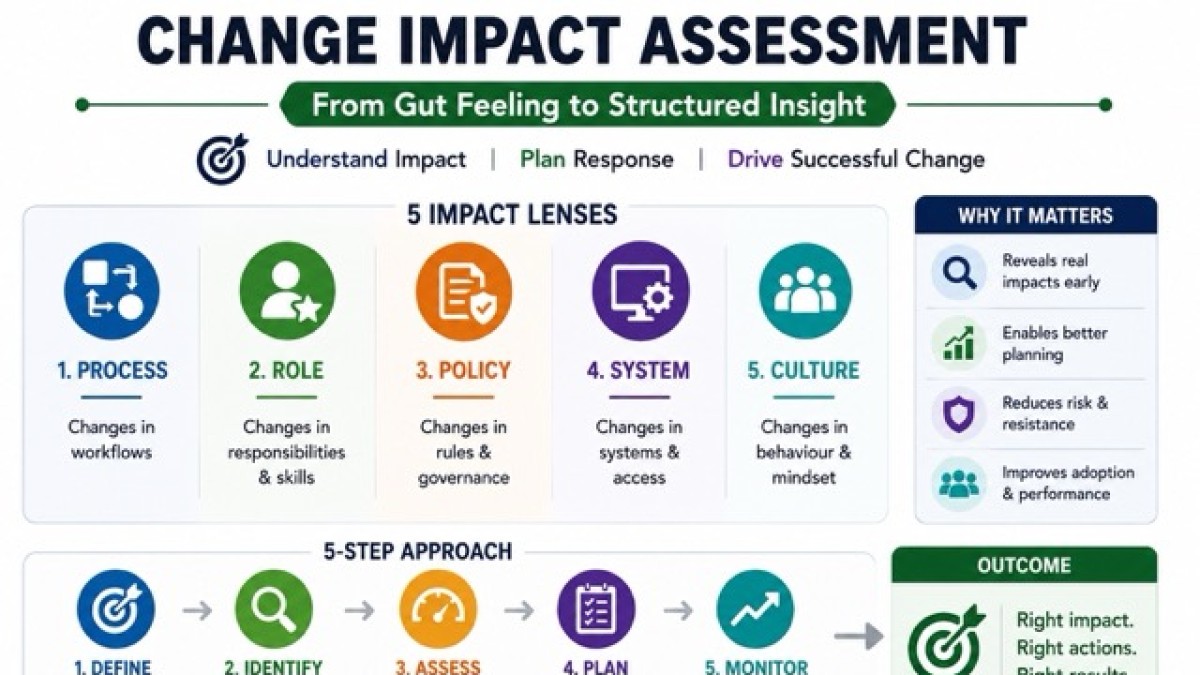
Turn gut feel into a structured change impact assessment—who, how, when, and what to do.

Most change programs don't fail because the solution is bad.
They fail because leaders "underestimate the collision." The collision between what the organisation is about to do and how people actually work today.
That underestimation usually sounds harmless:
- a) "It's only a new system."
- b) "It's just a revised process."
- c) "It's a policy refresh."
- d) "It won't affect everyone."
And then reality hits.
Workarounds. Confusion. Delays. Resistance that looks "emotional" but is actually operational. Training that doesn't land. Communication that doesn't stick. Risks that show up late, when they're expensive.
A proper Change Impact Assessment (CIA) is how you stop guessing.
It converts vague intuition into structured insight; so, you can design the right training, communication, resourcing, and risk controls before the rollout harms performance.
This article gives you a practical way to map impacts across process, role, policy, system, and culture, with realistic examples, and shows how a good assessment becomes the engine for better change execution.
Why gut feeling is not impacting assessment
"Impact" is not a mood.
Impact is the delta between current state and future state that people must absorb across:
- a) What they do (process)
- b) How they do it (systems/tools)
- c) What they are allowed to do (policy/compliance)
- d) What they are accountable for (roles/RACI)
- e) What they believe is "normal" and rewarded (culture/behaviours)
If you don't map that delta precisely, your plans become generic:
- a) Generic training ("system overview") instead of role-based skill-building.
- b) Generic comms ("benefits of change") instead of addressing "what changes for me on Monday morning."
- c) Generic resourcing ("change champions") without defining where the workload spike will occur.
- d) Generic risk logs ("adoption risk") without triggers, controls, and owners.
A Change Impact Assessment is the discipline of converting "this might affect people" into who is affected, how, how much, when, and what must be done about it.
The five impact lenses that actually matter.
When teams say, "we assessed impacts," they often mean they listed stakeholders. That's not enough.
You want five lenses; because change doesn't land in one dimension.
1) Process impacts. What changes in the workflow?
- a) Steps added / removed
- b) Sequence changes
- c) Handoffs across teams
- d) New approvals or controls
- e) New SLAs and exception handling
- f) New metrics or definitions of "done"
2) Role impacts. What changes in accountability and capability?
- a) Role purpose changes (why the role exists)
- b) Responsibilities and decision rights
- c) New skills required; old skills less relevant
- d) Workload spikes; new peak periods
- e) Dependency changes (who the role must coordinate with)
- f) RACI shifts (who is accountable vs consulted)
3) Policy impacts. What changes in rules, governance, and compliance?
- a) New mandatory steps
- b) New thresholds / limits
- c) Documentation and audit evidence requirements
- d) Delegation of authority (DOA) changes
- e) Regulatory or contractual obligations
- f) Disciplinary consequences for non-compliance
4) System impacts. What changes in tools, data, and digital behaviour?
- a) New system or module
- b) New screens, fields, validations
- c) Data ownership changes
- d) Integration or handoff automation changes
- e) Access rights and user provisioning
- f) Reporting logic and dashboards
5) Cultural and behavioural impacts. What changes in "how we do things around here"?
- a) Mindset shifts (from "speed" to "control," or from "heroics" to "standardisation")
- b) Transparency changes (more traceability, less informal decisions)
- c) Power shifts (centralisation, shared services, governance bodies)
- d) New expected behaviours (documenting, escalating, coaching, peer review)
- e) Trust impact ("the system is watching" vs "the system helps me")
If you map only process and system, you get technical readiness. If you also map role, policy, and culture, you get operational adoption.
A structured impact assessment method you can repeat.
Here's a practical approach that works in real organisations; not just in workshops.
1) Define the "change units" you will assess
Avoid one giant bucket called "the project." Break the change into assessable units, such as:
- a) Process area (Order-to-Cash, Procurement, Incident Resolution, Safety Response)
- b) Release or phase (Pilot, Phase 1, Phase 2)
- c) Site / location (Plant A, HO, Region West)
- d) Role group (Frontline, Team Leaders, Approvers, Auditors)
- e) System module (CRM, ERP Finance, HRMS)
Example: Instead of "ERP rollout," define change units like:
- a) Vendor onboarding in ERP
- b) Purchase requisition and approvals
- c) GRN and invoice matching
- d) Payment runs and bank integration
Why this matters: each unit has different impacts, training needs, comms, and risks.
2) Establish the current-state baseline (don't skip this)
Impact is always relative. So, capture baseline quickly:
- a) Current process map (even a simplified swimlane)
- b) Current roles and decision rights (RACI snapshot)
- c) Current policies/controls (what is mandatory today)
- d) Current systems/tools used (including shadow tools)
- e) Current behavioural norms (what people really do, not what policy says)
Reality check question: "What do people do when the process is too slow?"
That question reveals the real baseline; workarounds, WhatsApp approvals, spreadsheets, verbal instructions. Your future-state design will collide with those habits. Better to see them early.
3) Map the future-state deltas using the 5 lenses
Now compare current vs future and capture deltas. A good impact statement is concrete:
- a) "Adds a new approval step" (process)
- b) "Moves accountability from Site Admin to Finance Controller" (role)
- c) "Mandates two quotes above ₹X and attaches evidence" (policy)
- d) "Introduces mandatory fields and blocks submission if missing" (system)
- e) "Requires escalation instead of local workaround" (culture)
Avoid vague phrases like "process will change" or "system enhancement."
4) Score each impact so you can prioritise
Not all impacts are equal. Use a simple scoring model so the organisation stops treating everything as "high impact." A practical scoring set:
- a) Magnitude (1–5): how big is the behavioural change?
- b) Breadth (1–5): how many people / roles are affected?
- c) Frequency (1–5): how often will this occur (daily vs quarterly)?
- d) Complexity (1–5): how difficult to learn / do correctly?
- e) Risk criticality (1–5): what happens if done wrong (safety, money, compliance, customer)?
Then calculate a priority band (High / Medium / Low). This turns impact assessment into action; not a document.
5) Identify "impact clusters" (where adoption will break first)
This is the step most teams miss. Impacts don't occur in isolation. They cluster around:
- a) Approval-heavy steps
- b) Handoffs between departments
- c) Data quality ownership
- d) Exceptions and edge cases
- e) Peak workload periods (month-end, project mobilization)
Example cluster: A new procurement policy mandates competitive quotations + ERP entry + DoA approval.
The cluster risk isn't "training." It's cycle time + compliance fatigue + bypass attempts. If you identify clusters early, you can design controls and support where it matters.
6) Convert impacts into four enablement outputs (the point of the exercise)
A good assessment produces four tangible plans:
- Training needs map
- Communication plan by audience and impact
- Resourcing plan for the workload spike and support model
- Risk and controls plan (prevention + detection + response)
If you finish the assessment and none of these plans change, the assessment was theatre.
7) Validate impacts with the people doing the work
You don't validate impacts in steering committees. You validate impacts with:
- a) A few strong performers
- b) A few average performers
- c) One "friendly skeptic"
- d) Someone who handles exceptions
- e) Someone who audits / approves
Ask them to walk through "a day in the life" under the new model. This is where hidden impacts appear.
Practical examples of mapping impacts across the five lenses.
Let's make this real.
Example 1: Introducing an Incident Resolution & Prevention workflow
Change: A formal incident reporting and prevention process is introduced across departments (operations, customer service, facilities, HR, IT).
Process impacts
- a) New incident intake steps (logging, categorisation, triage)
- b) New handoffs (frontline → incident owner → reviewer)
- b) New closure requirements (RCA, corrective action evidence)
Role impacts
- a) Frontline must log incidents, not "handle quietly"
- b) Managers become accountable for closure and prevention actions
- c) A governance role reviews trends and escalations
Policy impacts
- a) Mandatory reporting thresholds (what must be logged)
- b) Time-bound SLAs for response and closure
- c) Evidence requirements for audit trail
System impacts
- a) Incident tool or portal introduced
- b) Mandatory fields; attachments; status workflow
- c) Dashboards for trends and repeat incidents
Cultural impacts
- a) Shift from "don't create noise" to "report and learn"
- b) Psychological safety concerns ("will reporting get me blamed?")
- c) Managers must coach, not punish, early reporting
Enablement outputs:
- a) Training becomes role-based: frontline logging + managers RCA + governance trend analysis
- b) Communication focuses on why reporting protects people and the "no blame for reporting" stance
- c) Resourcing includes incident owners, time allocation for RCA, and a weekly review cadence
- d) Risk plan includes prevention of under-reporting (anonymous channel, audits of major incidents, cross-check with security logs)
Example 2: Centralising procurement approvals with a new policy + ERP controls
Change: Company moves from informal buying to governed procurement with ERP-based requisitions, DoA, and three-quote policy.
Process impacts
- a) Requisition must be raised before purchase
- b) Quotes must be attached and compared
- c) Approvals are routed by value and category
- d) Exceptions require documented justification
Role impacts
- a) Users shift from "buyer" to "requester"
- b) Procurement becomes gatekeeper + advisor, not just PO issuer
- c) Finance / approvers carry new accountability for compliance
Policy impacts
- a) Defined thresholds, preferred vendors, conflict-of-interest declarations
- b) Mandatory documentation for audit
- c) Consequences for off-process buying
System impacts
- a) ERP validation blocks PO without approved PR
- b) Vendor master governance tightened
- c)Reporting shows maverick spend
Cultural impacts
- a) Shift from speed / relationships to transparency / traceability
- b) Perception risk: "procurement slows us down"
- c) Power shift: fewer informal approvals
Enablement outputs:
- a) Training focuses on "how to buy fast within the process," including exceptions and urgent needs
- b) Communication addresses predictable objections (lead time, emergency buys, vendor relationships) and clarifies what's changing for each requester group
- b) Resourcing includes super-users in high-volume departments and backfill during initial months
- c) Risk planning covers maverick spend, fake quotations, rushed approvals, and data quality issues in vendor master
Example 3: Rolling out a performance culture shift (not just a system)
Change: A company introduces OKRs, monthly performance reviews, and coaching expectations.
Process impacts
- a) Monthly review cadence
- b) OKR setting, check-ins, scoring and retrospectives
Role impacts
- a) Managers must coach, not only evaluate
- b) Employees must self-track progress and blockers
- c) HR becomes enablement partner + governance
Policy impacts
- a) Standard review format and evidence expectations
- b) Promotion and compensation linkage rules
System impacts
- c) OKR tracking tool introduced •Dashboards and reporting
Cultural impacts (this is the core)
- a) Shift from "do the work quietly" to "make progress visible"
- b) Shift from "manager as judge" to "manager as coach"
- c) Psychological safety needed to discuss misses and learning
Enablement outputs:
- a) Training is mostly behavioural: coaching conversations, feedback, goal clarity
- b) Communication must normalise learning and iteration, not perfection
- c) Resourcing includes manager enablement sessions and peer circles
- d) Risk planning focuses on "checkbox OKRs," manager avoidance, and performance anxiety
How a good impact assessment improves training
Training fails when it is designed around content instead of impact. Impact assessment gives you a training blueprin:
1) Role-based curriculum (not one-size-fits-all)
Instead of "ERP training," you get:
- a) Requester training (how to raise PR + attach quotes + avoid rejection)
- b) Approver training (DOA rules + risk indicators + turnaround expectations)
- c) Procurement training (vendor governance + exceptions + negotiation documentation)
- d) Finance training (3-way match + payment block reasons + dispute handling)
2) Scenario-based learning (where mistakes happen)
Impacts reveal where people will struggle:
- a) Exceptions (urgent purchases, partial deliveries, disputed invoices)
- b) Month-end pressure •Data corrections
- c) Cross-functional handoffs So, training includes realistic simulations, not just navigation.
3) Proficiency targets (what "good" looks like)
Impact scoring identifies high-risk steps. Those steps require:
- a) Demonstration of competence (not attendance)
- b) Quick reference guides
- c) Performance support (job aids, checklists)
- d) Floor-walkers or super-user support
Example: If "incorrect incident categorisation" breaks trend analytics, you train categorisation with examples and add a decision tree job aid.
How a good impact assessment improves resourcing.
Resourcing is not only "how many people are needed."
It's where the workload moves, when it spikes, and who gets overloaded. Impact assessment highlights:
- a) New work created (documentation, approvals, data entry)
- b) Work shifted between teams (site → central function)
- c) Peak periods (month-end, project mobilization)
- d) New expertise needed (RCA facilitators, super users)
Resourcing outputs you can design from impacts
- a) Temporary backfill for key roles during go-live
- b) Super-user network in high-volume areas
- c) Clear support model (Tier 0 job aids, Tier 1 helpdesk, Tier 2 experts)
- d) Workload rebalancing (redistribute approvals, delegate within DOA)
Example: If a new incident process adds manager workload for RCA, you either:
- a) Reduce unnecessary RCA for low-severity events, or
- b) Allocate time + support templates, or
- c) Provide RCA facilitators. Otherwise, closure will lag and the process will be bypassed.
How a good impact assessment improves risk planning.
Most "change risks" are not mysterious.
They are predictable outcomes of specific impacts. Impact assessment lets you build a risk plan with:
- a) Triggers (early warning signals)
- b) Preventive controls (design + enablement)
- c) Detective controls (dashboards, audits, sampling)
- d) Response actions (who fixes what, how fast)
Example: Risk planning from procurement impacts
Impact: ERP blocks PO without approved PR and quotes
Risk: Maverick buying and fake quotations Controls:
- a) Prevent: training + clear emergency process + vendor panel
- b) Detect: monthly maverick spend report + quote sampling
- c) Respond: corrective action, supplier blacklisting rules, escalation path
Example: Risk planning from cultural impacts
Impact: "Report incidents rather than manage quietly"
Risk: Under-reporting due to fear Controls:
- a) Prevent: leadership stance, anonymous reporting, no blame for reporting
- b) Detect: cross-check incident volume vs security / medical logs
- c) Respond: coaching, reinforcement, and corrective action for deliberate non-reporting
The most common impact assessment mistakes
- Only mapping stakeholders, not work. Names are not impacts. Workflow deltas are impacts.
- Ignoring culture because it feels fuzzy. Culture is not fuzzy when you define the behavioural shift explicitly.
- Treating all impacts as equal. No scoring = no prioritisation = generic enablement.
- Skipping validation with frontline teams. Edge cases live with frontline teams. That's where adoption breaks.
- Creating a document, not decisions. If the assessment doesn't change training, comms, resourcing, and risk plans, it was paperwork.
A practical impact assessment template you can use immediately.
For each change unit, capture:
- a) Change unit name (process / module / release)
- b) Impacted groups / roles
- c) Impact lens (process / role / policy / system / culture)
- d) Current state (1–2 lines)
- e) Future state (1–2 lines)
- f) Impact statement (what must change)
- g) Impact score (magnitude, breadth, frequency, complexity, risk)
- h) Enablement needs (training, comms, support)
- i) Resource needs (time, backfill, super users)
- j) Risks + controls (prevent / detect / respond)
- k) Owner (who ensures readiness)
This is the backbone of structured insight.
Closing insight: the real purpose of impact assessment
A Change Impact Assessment is not a "change management deliverable." It is a decision-making tool.
It tells you:
- a) What to train,
- b) What to communicate,
- c) Where to allocate support,
- d) What risks to prevent,
- e) And where adoption will crack first.
It takes change from hope to preparedness. And preparedness is what makes change sustainable—because people don't resist change in theory. They struggle with change in practice.
Categories: : Change Impact